ViewTurboLinux
Linux: questions and answers
Find answers to common questions and get back to what matters.
On this page
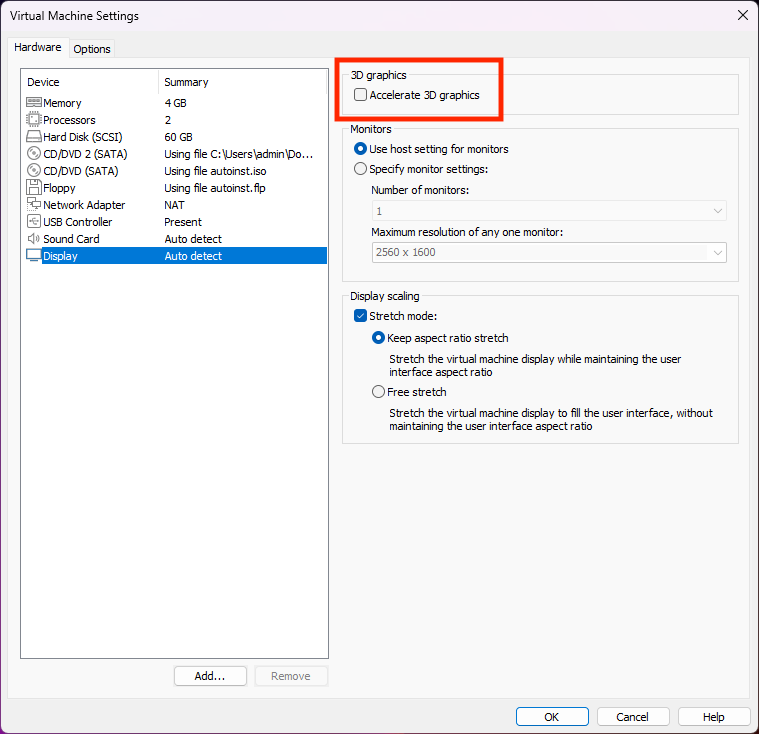
GUI version main interface displays abnormally?
If you use Linux created by VMare, the main interface may display abnormally. Please try disabling VMware's 3D acceleration option.
Text displays abnormally in the CLI interface?
Please delete ~/.config/ViewTurbo.
Proxy address?
HTTP:127.0.0.1:15732
SOCKS5:127.0.0.1:15732
Telegram is not available?
Telegram needs to set the socks5 proxy address 127.0.0.1 port 15732. Select it and then theoretically, in the state that is not logged in to telegram, the state in the connection will be processed all the time. Exit telegram immediately and restart telegram.
Please restart ViewTurbo and Telegram programs. Or restart the system
sudo: not found
If you use various extensions based on the OpenWrt, such as iStoreOS. The download command you copied in ViewTurbo is:
sudo bash -c "$(curl -ksSL https://assets.vtfly.com/others/linux/install.sh)"
sudo: not found may appear. This is because the account preset for iStoreOS is root, so you don't need to use sudo, change the command to:
bash -c "$(curl -ksSL https://assets.vtfly.com/others/linux/install.sh)"
Node test failed?
Please select the region and your real country or region in the settings, otherwise it will not be able to connect to our server or cause AI proxy to be very slow.
Gemini isn’t currently supported in your country. Stay tuned!
method 1
Chrome/Edge (Chromium browser)
- Open settings: chrome://settings/content/location
- Set “Location” to: Block (Don’t allow sites to see your location)
Just restart the browser.
method 2
On the recharge page of our official website, purchase private nodes and purer IPs.
How to use it in docker? 
- Please prepare a Linux system first and install the cli version of ViewTurbo
- After logging in, run viewturbocore and select acceleration.
- Copy the contents of the /root/.config/ViewTurbo/config.ini file.
- Add reference steps in Dockerfile
RUN bash -c "$(curl -ksSL https://assets.vtfly.com/others/linux/install.sh)"

RUN mkdir -p /root/.config/ViewTurbo && \
echo "paste your config.ini content here" > /root/.config/ViewTurbo/config.ini

CMD ["sh", "-c", "viewturbocore --start && tail -f /dev/null"]
In this way, your other programs can use our http and socks5 proxy addresses!
Git cannot use proxy successfully?
Please ensure that there is only one Git version on your local machine, and there are no other Git paths in the environment variables.
Set up Socks5
Currently, socks5 forwarding addresses can only be configured for private nodes. This lets you add a residential broadband IP on top of a private node to help ensure IP cleanliness. If you need to set it up, go to https://www.viewturbo.com/my > Private node management and add it there.